
Your district has the data. Why are the answers so hard to get?
Unified Intelligence turns the data already sitting in your SIS into clear answers, customized reports, and decision-ready recommendations. No data ticket. No two-week wait.
Start with your state
Funding and accountability rules change at the state line. Pick yours to see the questions, the dollars, and the deadlines that actually apply.
Report built in 5.2s from 48,212 SIS records
Enrollment Analysis
Top finding
High school enrollment is down 12.8% since 2019—614 fewer students, with most of the loss in 9th and 10th grade.
Recommended next step
Build the 2027–28 master schedule and staffing plan around a smaller incoming 9th-grade class.
Pattern 1 · By grade
The decline starts at 9th-grade entry.
Pattern 2 · By school
Evidence
Every number traces back to your SIS records.
Next steps
Three moves before course requests open.
Size 2027–28 course sections for a smaller 9th-grade class
Contact students who withdrew from 9th and 10th grade at High School B
Flag credit-deficient 10th graders before semester end
Assistant superintendents
Get the answers you need without adding another task to your team’s workload.
Superintendents
Make confident district-wide decisions without waiting weeks for the analysis.
Small and mid-size districts
Enterprise-level analytical capability. No dedicated data analytics team required.
The real constraint
What if every district leader had their own data analyst?
Most districts are not short on data. They are short on the analytical capacity to interpret it. One more dashboard does not fix that — it moves the work back onto the person asking the question.
Without analytical capacity
A question becomes a ticket, a ticket becomes a queue, and the decision gets made before the analysis arrives.
With Unified Intelligence
A leader asks in plain English and receives a customized report — findings, breakdowns, evidence, and a recommended next step.
Analytical capacity, not another dashboard.
The deliverable
One question in. A comprehensive analysis out.
A district leader asked one question in plain English. About ten minutes later they had a comprehensive early-warning analysis — findings, stated evidence for every number, and recommended next steps with cited support. Three slides from it are below.
The question asked
Which of our high-school students carry more than one early warning, and what does the evidence actually support?
About ten minutes later
A comprehensive early-warning analysis
School and student-level evidence, denominator cautions, and recommended next steps with numbered citations.


It states what it cannot say
Zero observed failing grades is reported as thin evidence coverage, not as good news.
Every figure is traceable
Absent days, eligible days, and rates are shown so any number can be checked.
It ends in named action
Recommendations carry an approach, a rationale, and numbered evidence.
Anonymized from a real district analysis. District name, school names, and student identifiers replaced.
Your data stack, connected
Sits above your SIS. Connects the rest.
Unified Intelligence does not replace your SIS. It sits on top of it — then brings in the district data that lives outside it.
Our technology
Unified Intelligence
HR data
Staffing and position detail
Formative assessment
In-year learning signals
Social-emotional
Whole-child indicators
State-level data
Public accountability files
Your SIS stays the system of record. District access, ownership, and governance stay in place.
From question to action
No query language, no data ticket, no two-week wait.
Ask
Any authorized leader asks about schools, grades, student groups, or trends — in their own words.
Plan
For deeper questions, review the analysis plan. Approve, refine, or redirect it before anything runs.
Run and check
Calculations run as code across the read-only SIS replica and approved district sources.
See the evidence
School and grade patterns, students needing attention, and stated data limitations.
Act
Route the next step to a counselor, principal, MTSS lead, or CBO, then follow it in the weekly briefing.
Built around your state’s rules
Funding and accountability change at the state line. So do the questions.
How California pays for students
What your cabinet can ask in California
The full California page goes deeper: the funding math, the three questions for this year, role-by-role views, and the 60-day trial. Open it →
Why an intelligence system
Dashboards report. Intelligence reasons.
The shift is not another chart. It is a tireless analyst that investigates, checks its work, and brings the most important findings to you every week.
| A dashboard | Unified Intelligence |
|---|---|
| Shows you a number. | Explains what is driving it, school by school. |
| Waits for someone to look. | Proactively briefs your cabinet on the top findings each week. |
| Requires a ticket and an analyst. | Plans, runs, and checks a plain-English question on demand. |
| Leaves leaders to reconcile reports. | Shows the data date, analyses, and evidence behind every claim. |
| Stops at the chart. | Sends the next step to a counselor, principal, MTSS lead, or CBO. |
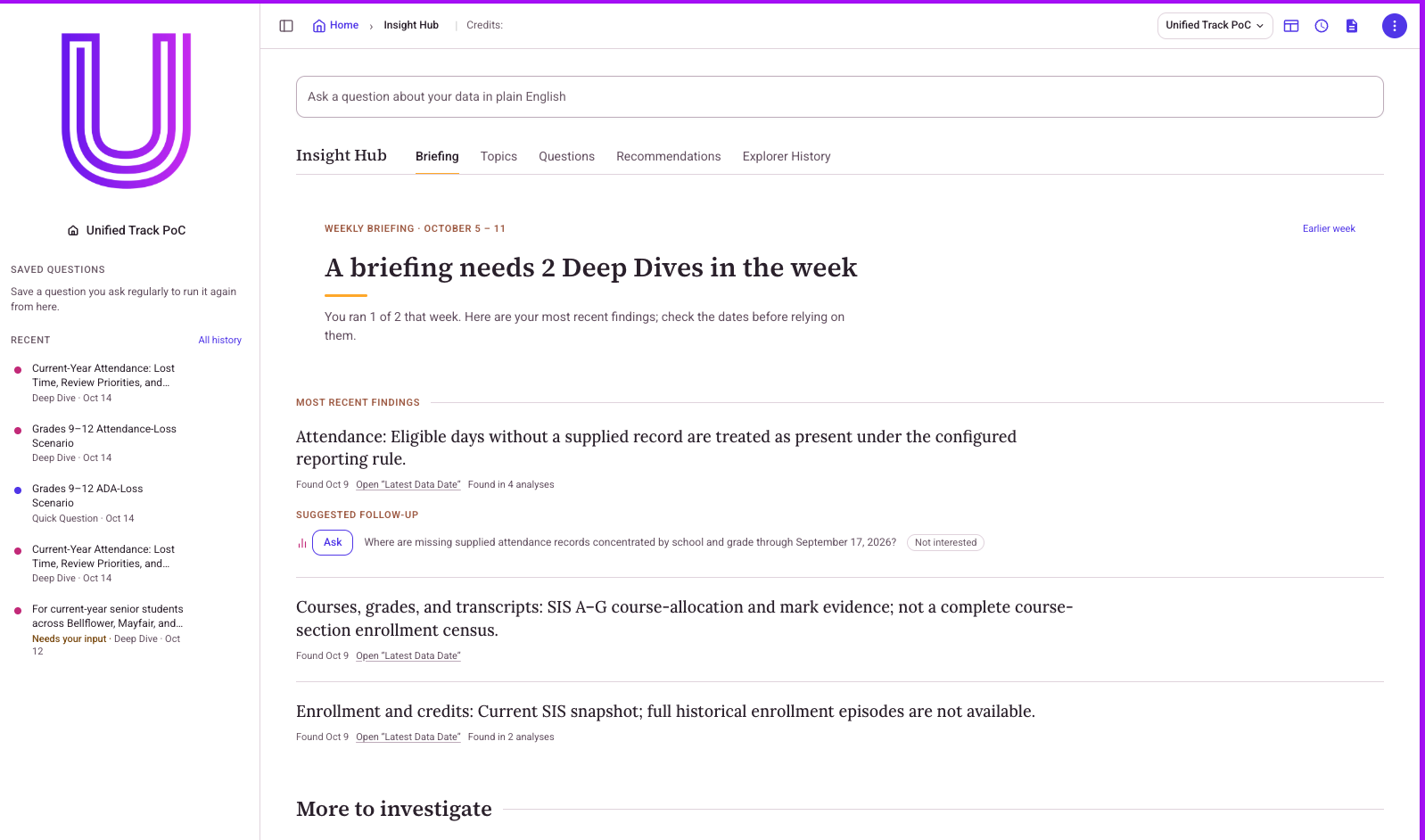
The Insight Hub
Answers pushed to you, every week.
Stop hunting through dashboards. Insight Hub brings district leaders a weekly briefing of checked findings, evidence, and next questions.
- ✓Proactive weekly briefings
- ✓Plain-English findings
- ✓Suggested follow-up questions
Why an isolated intelligence layer
Not a direct AI connection to your SIS.
The most common approach routes natural-language questions directly into a third-party large language model, alongside live student data. That creates two problems.
Problem 1 · Accuracy
Language models are unreliable at precise math. “What happens to my funding if attendance rises 4%?” risks a subtly wrong answer staff can’t easily verify.
Problem 2 · Security
Routing identifiable student data into a third-party model raises real FERPA questions and doesn’t sit comfortably with a SOC 2 posture.
Isolated by design
Every step stays inside a dedicated environment built for your district. Nothing is processed inside a third-party AI model, and every numeric answer is computed, not guessed.
What happens with every request · all nine steps
- 01Identifies who is asking
- 02Verifies the user’s permissions
- 03Determines which data fields are required
- 04Retrieves only the authorized data
- 05Applies district business rules
- 06Writes and executes code for the calculation
- 07Verifies the calculation runs cleanly
- 08Generates a response, report, or chart
- 09Records the transaction for auditing
Security & data governance
The district keeps ownership and governance of its data at all times.
Fully isolated environment
Replicated into an environment built for your district alone — never processed inside a third-party AI model.
Read-only integration
The intelligence layer cannot modify SIS records.
Verified calculations
Numbers, projections, and funding scenarios are computed by executing code.
Role-based access
Counselors, principals, and leaders see only what their role permits.
Audit logging
All AI requests are logged and available for district review.
District data ownership
Student data is never used to train external AI models.
Start here
A no-cost, 60-day trial to get your district set up.
If it isn’t the right fit, you simply don’t continue. Nothing is billed.
Does your district have a data analyst team?
If not, leaders get a full report without a data ticket. If you do, your analysts get time back for harder questions.
Need customized reports for principal meetings?
Ask for the report you need — by school, grade, or student group — with findings, evidence, and next steps.
Bring an intelligence layer to your district
See what data intelligence looks like for your district.
Book a live walkthrough to see how Unified Intelligence works with governed district data.
Book a meeting to learn about Unified Intelligence
Pick a time that works. We’ll show you how Unified Intelligence turns district data into checked findings and clear next steps.
Email — new inquiries
partnerships@unifiedtrack.comEmail — existing customers
support@unifiedtrack.comCall support
+1 (800) 477-2808Headquarters
Davis, CA
Regional offices
Knoxville, TN · Boston, MA · New York, NY
Calendar not loading? Open the booking page